Display P3 Photos and ICC Profiles: What Stripping the Profile Does
An ICC profile cost about 480 bytes. Removing it from Display P3 photos shifted colours by a median ΔE of 1.1, up to 2.3, and cut colourfulness by 12 % in Chrome.
Phones and many recent laptops capture and display colour in Display P3, a wider colour space than the web’s traditional sRGB. A JPEG stores which colour space its numbers mean in an embedded ICC profile. Many image optimisers strip metadata to save bytes. What does the profile cost in bytes, does Chrome use it, and what happens to the colours when it is removed? We converted our 20 photos to Display P3 and tested each step.
The test
Each of our 20 CC0 photos (1600 pixels, sRGB) was saved with sharp 0.35.5 as MozJPEG quality 90 three ways: sRGB without a profile, sRGB with an embedded sRGB profile, and converted to Display P3 with an embedded P3 profile. We then made a fourth version by deleting the ICC segment from the P3 file without re-encoding, which is what a metadata-stripping tool does. For every photo we computed the colour difference (CIEDE2000, ΔE) between the P3 file shown correctly and the stripped file shown as sRGB, the way a browser shows an image without a profile. Finally, we displayed five photos in Chrome 155.0.8059.82 in all versions, took screenshots and compared their pixels with the sRGB file. See our methodology.
Results
The profile is small. The embedded P3 profile was 480 bytes, and adding an sRGB profile to an sRGB file added a median 498 bytes. Converting to P3 even made the files a median 4.1 KB smaller than the sRGB originals, because the same colours are expressed with less saturated numbers in the wider space.
Chrome used the profile. In Chrome’s screenshots, the P3 files with their profile differed from the sRGB files by a mean of 0.8 to 1.8 levels per channel, no more than two separately encoded JPEGs normally differ. With the profile stripped, the difference grew to 1.3 to 3.7 levels: Chrome could no longer tell which colours the numbers meant.
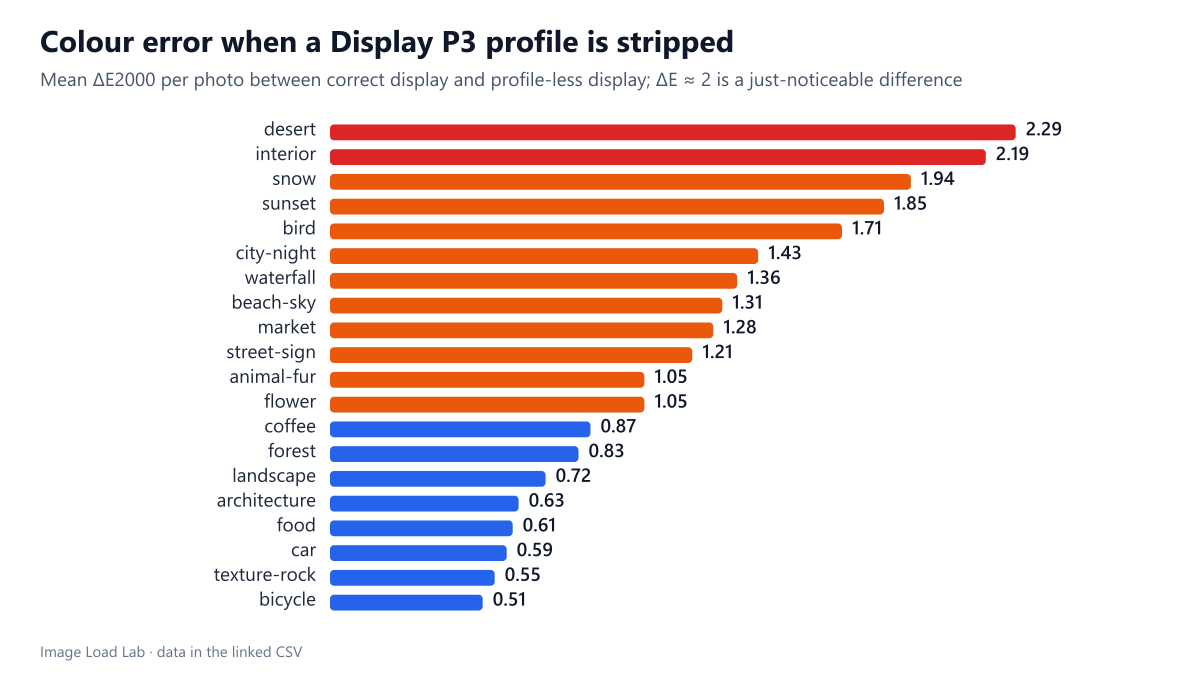
Stripping the profile shifted colours, mostly towards dullness. The mean ΔE between the correct and the stripped version ranged from 0.51 to 2.29 per photo, with a median of 1.1. A ΔE around 2 is often given as the point where a careful observer notices a difference side by side; at the median, 17 % of the pixels in a photo exceeded it. Average colourfulness (chroma) fell by 12 %, from 11.6 to 10.1, because P3 numbers read as sRGB describe less saturated colours.
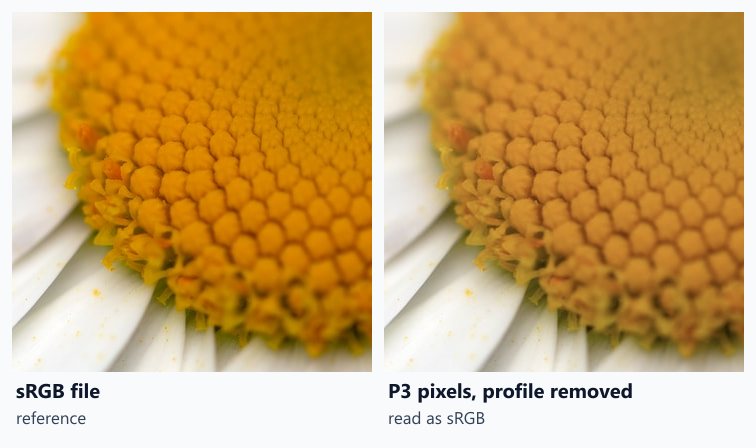
The crop of a daisy’s orange-yellow centre shows the effect on a saturated colour: the stripped P3 version looks duller and browner than the sRGB reference.
What to do
- Never strip the profile from a non-sRGB image. 480 bytes is a small price for correct colour.
- If your pipeline strips metadata, convert to sRGB first. An sRGB image without a profile is displayed correctly by browsers, because sRGB is the default assumption. In sharp, the default output is already converted to sRGB unless you ask to keep the profile.
- Check phone uploads. Photos from recent phones are often Display P3; a plugin that removes all metadata, as discussed in our EXIF metadata test, can make them look duller.
- Keep P3 only when you need its colours. Images whose colours fit in sRGB gain nothing from P3; true wide-gamut colours do, but only on wide-gamut screens.
Practical conclusion
An ICC profile cost about half a kilobyte, Chrome 155 used it to display Display P3 photos correctly, and removing it shifted colours by a median ΔE of 1.1 (up to 2.3 per photo) and cut colourfulness by 12 %. Keep profiles on wide-gamut images, or convert to sRGB before stripping metadata.
Limitations
Our P3 files were converted from sRGB photos, so they contain no colours outside sRGB; real wide-gamut photos would show larger shifts when stripped. Chrome screenshots were taken on a standard sRGB rendering path in headless mode, and we tested Chrome only.
Data and files
Download p3-profile-strip.csv (20 rows, 0.9 KB) · Download p3-profile-encodes.csv (60 rows, 4.5 KB) · Method: testing methodology. Photos: image credits.