Greyscale JPEG vs Colour JPEG for Black-and-White Photos
Saving black-and-white photos as one-channel greyscale JPEGs made them only 1.2 to 2.3 % smaller than colour JPEGs at identical quality. WebP ranged from 47 % smaller to 28 % larger.
A black-and-white photo saved as an ordinary JPEG still carries three channels: brightness and two colour channels that contain nothing. JPEG can also store a single greyscale channel. How many bytes does a true greyscale JPEG save over a colour JPEG of the same black-and-white image, and is WebP any better? We converted our 20 test photos to black and white and saved each one three ways at three quality settings.
The test
Each of our 20 CC0 photos (1600 pixels) was converted to greyscale with sharp 0.35.5, and that greyscale image became the reference. It was then saved as a normal three-channel JPEG (MozJPEG, the colour channels simply flat), as a one-channel greyscale JPEG (MozJPEG with the b-w colour space), and as WebP, at quality 70, 80 and 90. WebP has no greyscale mode, so it always stores colour channels. Every file was scored with SSIMULACRA2 against the greyscale reference. See our methodology.
Results
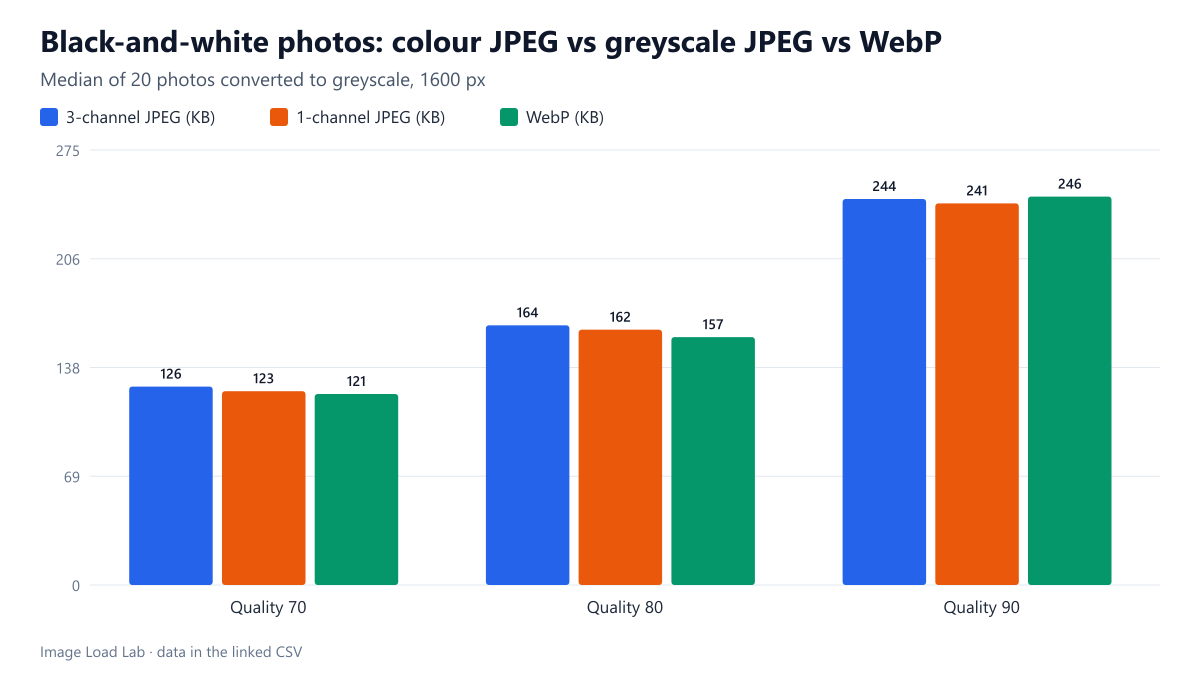
| Quality | Saved as | Median KB | vs 3-channel JPEG (range) | Median SSIMULACRA2 |
|---|---|---|---|---|
| 70 | 3-channel JPEG (colour space kept) | 125.5 | – | 72.3 |
| 1-channel greyscale JPEG | 122.6 | −2.3 % (−6.6 to −0.6) | 72.3 | |
| WebP | 120.8 | −5.5 % (−45.4 to +36.8) | 71.9 | |
| 80 | 3-channel JPEG (colour space kept) | 164.3 | – | 78.9 |
| 1-channel greyscale JPEG | 161.5 | −1.7 % (−4.5 to −0.5) | 78.9 | |
| WebP | 156.8 | −6.6 % (−47.5 to +27.6) | 77.6 | |
| 90 | 3-channel JPEG (colour space kept) | 244.2 | – | 85.5 |
| 1-channel greyscale JPEG | 241.4 | −1.2 % (−2.9 to −0.3) | 85.5 | |
| WebP | 245.7 | +2.6 % (−41.7 to +22.7) | 85.5 |
A one-channel JPEG saved only 1–2 %. At quality 80, the median black-and-white photo took 164.3 KB as a colour JPEG and 161.5 KB as a greyscale JPEG, 1.7 % less, with exactly the same score (78.9). The largest saving for any photo was 6.6 %, at quality 70; at quality 90 the median saving shrank to 1.2 %.
Why so little: in a colour JPEG of a grey image, the two colour channels are perfectly flat. JPEG compresses flat areas to almost nothing, and by default it also stores colour at half resolution, so those channels cost only a small fraction of the file. Removing them saves that fraction and no more.
WebP was not reliably smaller. At quality 80 the median WebP was 6.6 % smaller than the colour JPEG, but its score was 1.3 points lower, and the spread was huge: from 47.5 % smaller to 27.6 % larger depending on the photo. At quality 90 WebP was 2.6 % larger than the colour JPEG at the median. For black-and-white photos, WebP’s advantage depends on the picture.
What this means in practice
- Converting black-and-white JPEGs to single-channel files is optional. It is safe (every browser displays greyscale JPEG) and saves 1–2 %, which is worth it in a batch pipeline but not worth manual work.
- Do not expect black-and-white to halve file sizes. The cost of a photo is in its detail and texture, which the brightness channel carries in full.
- For bigger savings, change the format. AVIF stores colour channels too, but its overall efficiency on photos was far higher than JPEG’s in our format comparison.
- Toning matters. A sepia or tinted black-and-white photo has real colour information and is not a greyscale image; this test does not apply to it.
Check it on your own photos
With Node.js and sharp installed, this saves the same black-and-white image both ways so you can compare the sizes:
// save as compare.mjs and run: node compare.mjs
import sharp from 'sharp';
const grey = sharp('photo.jpg').greyscale();
await grey.clone().jpeg({ quality: 80, mozjpeg: true }).toFile('colour.jpg');
await grey.clone().toColourspace('b-w').jpeg({ quality: 80, mozjpeg: true }).toFile('mono.jpg');
With ImageMagick, magick photo.jpg -colorspace Gray -quality 80 mono.jpg writes a single-channel file. If the two sizes differ by more than a few percent, the colour version probably still contains a faint tint.
Practical conclusion
A true greyscale JPEG was a median 1.2–2.3 % smaller than a colour JPEG of the same black-and-white photo, at identical quality. Use it where your tools make it easy (sharp’s toColourspace('b-w'), ImageMagick’s -colorspace Gray), but expect a small gain.
Limitations
Our black-and-white images were created by converting colour photos, not shot or scanned in monochrome; film grain and scanning noise could change the numbers. MozJPEG through sharp only, at default 4:2:0 chroma subsampling for the colour JPEG.
Data and files
Download greyscale-jpeg.csv (180 rows, 23.0 KB) · Method: testing methodology. Photos: image credits.