Retina Screenshots: What a 2× File Really Costs
Four times the pixels cost 1.8 to 3.9 times the bytes. A 2× AVIF screenshot was about the size of a 1× JPEG, and its text was visibly sharper on 2× screens.
A screenshot taken on a high-density screen has twice the width and height of a normal one, so four times the pixels. Shown on a 2× phone or laptop, a 1× screenshot is enlarged by the browser and its text looks soft. A 2× file looks crisp but is heavier. How much heavier is a 2× screenshot in practice, and which format keeps it affordable? We encoded the same four page screenshots at 1× and 2× in six formats.
The test
The screenshots are the four captures of this site used in our lossless screenshot test: the home page, a guide, the methodology page and the srcset tool. They show the site’s previous dark design. Chrome captured each page at 1280 × 800 CSS pixels, once at 1× (1280 × 800 pixels) and once at 2× density (2560 × 1600 pixels).
With sharp 0.35.5, we saved each capture in six forms: the PNG as captured, a 256-colour palette PNG, WebP lossless (effort 6), WebP quality 90, AVIF quality 60 and MozJPEG quality 85. Then we showed the guide screenshot at 1280 CSS pixels wide on a 2× screen in Chrome 155.0.8059.82, once from the 1× file and once from the 2× file, and captured the result. See our methodology.
Results
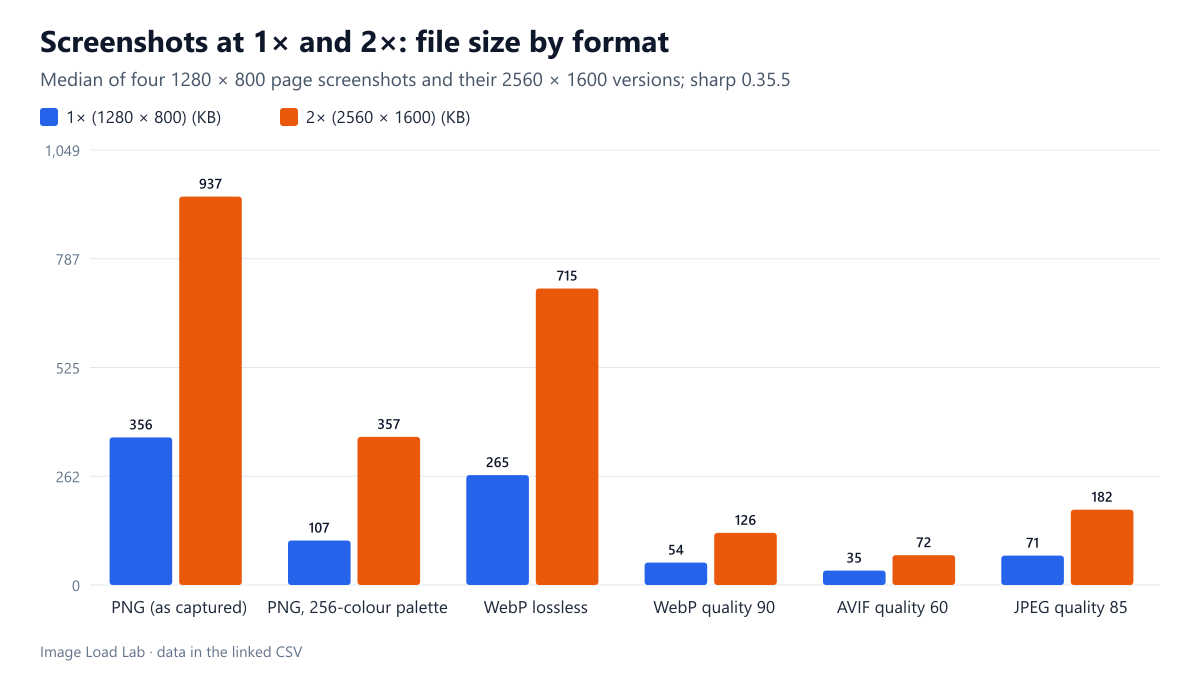
| Format | 1× median | 2× median | 2× ÷ 1× (range over 4 pages) |
|---|---|---|---|
| PNG (as captured) | 356 KB | 937 KB | 2.60–2.83× |
| PNG, 256-colour palette | 107 KB | 357 KB | 2.57–3.88× |
| WebP lossless | 265 KB | 715 KB | 2.56–2.91× |
| WebP quality 90 | 54 KB | 126 KB | 2.16–2.38× |
| AVIF quality 60 | 35 KB | 72 KB | 1.85–2.30× |
| JPEG quality 85 | 71 KB | 182 KB | 2.40–2.58× |
Four times the pixels cost 1.8 to 3.9 times the bytes. Lossless formats grew the most: the captured PNG and WebP lossless were about 2.6 to 2.9 times larger at 2×. Lossy formats grew less. WebP quality 90 grew 2.2 to 2.4 times and AVIF quality 60 only 1.8 to 2.3 times. Our reading is that the doubled resolution adds mostly smooth detail, such as finer edges on the same letters, which lossy encoders store cheaply.
The palette PNG was the least predictable. It grew 2.6 times on one page and 3.9 times on another. A likely reason is that the finer anti-aliasing at 2× produces more distinct colours, which a 256-colour palette handles less well.
A 2× file in a modern lossy format cost about the same as a 1× file in an older one. The median 2× AVIF (72 KB) was the size of the median 1× JPEG (71 KB). The median 2× WebP at quality 90 (126 KB) was a third of the 1× PNG as captured (356 KB).
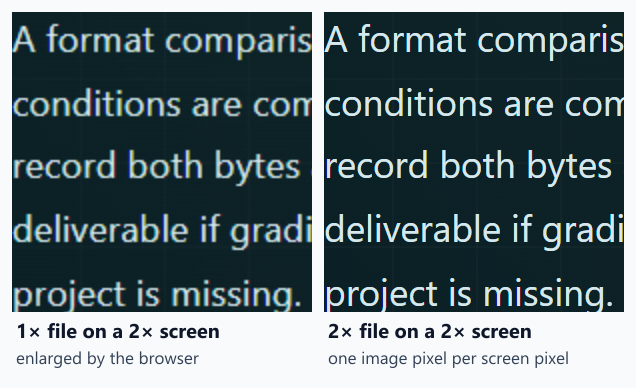
The visual difference is plain. On a 2× screen, text from the 1× file has soft edges and slightly blurred letter shapes; the 2× file draws one image pixel per screen pixel. For screenshots whose point is legible text or interface detail, that difference is what readers notice.
What this means
- Serve 2× screenshots to 2× screens only. Use
srcsetwith density descriptors so 1× screens keep the smaller file; our x vs w descriptor test shows how browsers choose. - Switch format before you skip 2×. Moving from PNG to a lossy WebP or AVIF saves more than dropping from 2× to 1×.
- Check lossy text yourself. We did not score the visual quality of these lossy files here. Fine text can show ringing or colour fringes in lossy formats. In our WebP quality test, these same 1× screenshots needed WebP quality 80 to 95 to reach a “high quality” SSIMULACRA2 score of 70, and none reached the stricter score of 80 even at quality 95.
- Crop to what matters. Cropping a capture to the relevant part of the screen removes pixels at any density, and the text stays larger when the image is scaled down on a phone.
Example markup
<picture>
  <source type="image/avif" srcset="settings-1x.avif 1x, settings-2x.avif 2x">
  <img src="settings-1x.png" srcset="settings-1x.png 1x, settings-2x.png 2x"
       width="1280" height="800" alt="Plugin settings page with the cache option enabled">
</picture>
If the screenshot is displayed narrower than its 1× width on some screens, use w descriptors and a sizes attribute instead, so phones do not download the 2560-pixel version for a 360-pixel slot.
Practical conclusion
Our 2× screenshots had four times the pixels but cost 1.8 to 3.9 times the bytes, and lossy formats grew the least. A 2× AVIF at quality 60 was about the size of a 1× JPEG at quality 85, while the text was visibly sharper on 2× screens. Serve 2× files to high-density screens through srcset, and choose the format first.
Limitations
Four screenshots of one dark-themed site, one setting per format and file sizes only. We did not measure the visual quality of the lossy versions, nor test 3× screens. Screenshots of photos or light interfaces will compress differently.
Data and files
Download retina-screenshots.csv (8 rows, 0.6 KB) · Method: testing methodology.