Animated GIF vs WebP vs AVIF: Three Animations Measured
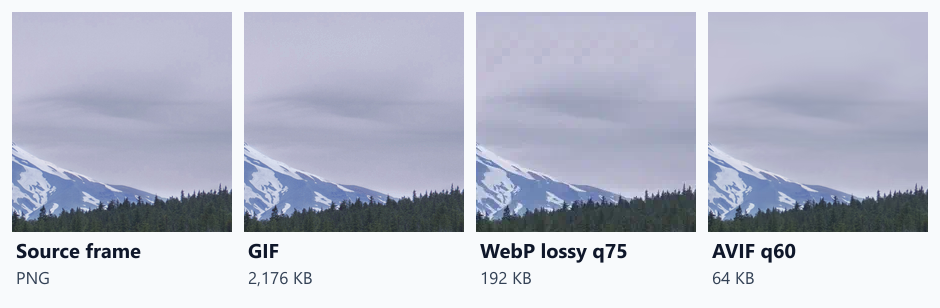
A two-second photo pan was 2,176 KB as GIF and 64 KB as AVIF. For a flat animated chart, lossless WebP was smallest at 3.7 KB. Lossy animated WebP scored worst.
GIF is still the default format for short animations on the web: reaction loops, product demos, animated charts. It is also one of the least efficient formats a browser supports. Chrome plays animated WebP and animated AVIF as well, in an ordinary <img> tag. How much smaller are they for different kinds of animation, and what happens to quality? We encoded three 24-frame animations in four ways.
The test
We built three animations of 24 frames at 80 ms per frame (about two seconds):
- a photo pan (480 × 320): a window sliding across a CC0 landscape photo of a snowy mountain, like a slow camera move;
- an interface scroll (480 × 300): a crop of a screenshot of this site scrolling upwards, like a screen recording;
- an animated chart (480 × 270): four flat-coloured bars growing on a white background.
Each was saved as a GIF (sharp 0.35.5 with its default 256-colour palette and dithering), as a lossy animated WebP at quality 75, as a lossless animated WebP, and as an animated AVIF at quality 60 with avifenc (speed 6). For quality, we decoded frames 1, 9 and 17 of each file and scored them against the source frames with SSIMULACRA2, where 100 means identical. Finally, we checked that Chrome 155.0.8059.82 decoded every animation with its ImageDecoder interface. See our methodology.
Results
| Animation | Format | File size | SSIMULACRA2 (median of 3 frames) | Encode time | Frames Chrome decoded |
|---|---|---|---|---|---|
| photo pan | GIF (256 colours) | 2,176.3 KB | 88.0 | 4.1 s | 24 |
| photo pan | WebP lossy q75 | 191.8 KB | 57.2 | 0.6 s | 24 |
| photo pan | WebP lossless | 3,485.8 KB | 100.0 | 7.3 s | 24 |
| photo pan | AVIF q60 | 63.7 KB | 83.5 | 0.6 s | 24 |
| interface scroll | GIF (256 colours) | 994.8 KB | 96.4 | 2.2 s | 24 |
| interface scroll | WebP lossy q75 | 233.6 KB | 67.6 | 0.5 s | 24 |
| interface scroll | WebP lossless | 845.0 KB | 100.0 | 3.0 s | 24 |
| interface scroll | AVIF q60 | 38.1 KB | 89.9 | 1.0 s | 24 |
| animated chart | GIF (256 colours) | 11.6 KB | 100.0 | 0.4 s | 23 |
| animated chart | WebP lossy q75 | 13.4 KB | 68.9 | 0.2 s | 23 |
| animated chart | WebP lossless | 3.7 KB | 100.0 | 0.2 s | 23 |
| animated chart | AVIF q60 | 5.4 KB | 94.9 | 0.4 s | 24 |
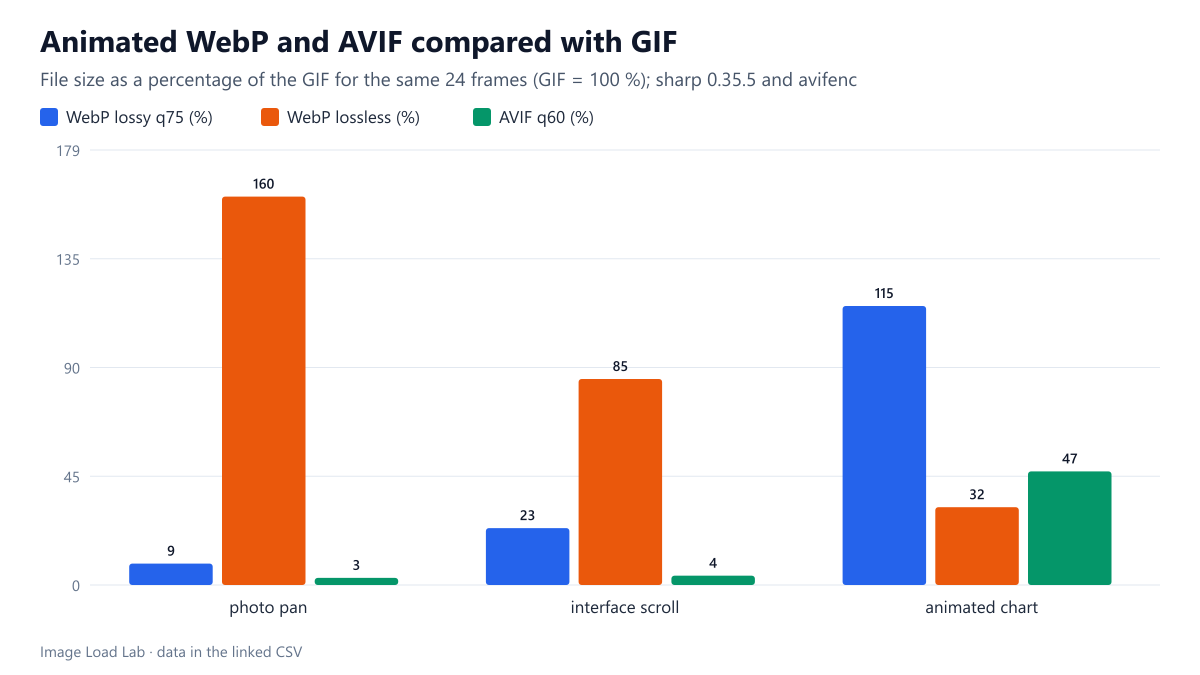
For photographic motion, GIF was enormous. The two-second photo pan weighed 2,176 KB as a GIF. The AVIF was 64 KB, 3 % of that, with a SSIMULACRA2 score of 83.5 against the GIF’s 88.0. Lossy WebP at quality 75 was 192 KB but scored only 57.2, and visibly blocky in the sky. Lossless WebP was larger than the GIF (3,486 KB), as expected for a perfect copy of photographic frames.
For the interface scroll, AVIF again won by far: 38 KB against 995 KB for the GIF, scoring 89.9. The GIF looked good, at 96.4, because the dark interface has few colours, but it was 26 times larger.
For the flat chart, lossless WebP was best: 3.7 KB with a perfect score, against 11.6 KB for the GIF, also perfect. AVIF was 5.4 KB at 94.9. Lossy WebP was the worst choice here, larger than the GIF (13.4 KB) and visibly degraded (68.9).
Chrome played every file. It decoded all 24 frames of every animation, except that GIF and WebP stored the chart in 23. Its last two frames were identical, and those encoders merged them into one longer frame, which looks the same.
What this means
- Replace photographic GIFs. In our test, an animated AVIF was 26 to 34 times smaller than the GIF for camera-like motion and screen recordings.
- For flat graphics, try lossless WebP first. It kept every pixel and was a third of the GIF’s size for our chart.
- Be careful with lossy animated WebP. At quality 75 it scored 57 to 69 here, below the score of 70 that our WebP quality test used as its “high quality” target, and for the chart it was larger than the GIF.
- Keep a fallback where needed. Use
<picture>with an AVIF source and a GIF or WebP<img>for older browsers, as covered in our source selection test. - Respect reduced motion. Offer a still image to visitors who ask for less motion, as tested in our reduced motion test.
- Consider video for long clips. A muted, looping
<video>is the usual alternative for longer animations. We did not test video formats here.
Example markup
<picture>
  <source type="image/avif" srcset="demo.avif">
  <img src="demo.webp" width="480" height="300" alt="Scrolling through the settings page" loading="lazy">
</picture>
Practical conclusion
For a two-second photo pan, animated AVIF was 64 KB against 2,176 KB as GIF, with good quality. For a screen recording, 38 KB against 995 KB. For a flat animated chart, lossless WebP was the smallest at 3.7 KB, a third of the GIF. Lossy animated WebP at quality 75 was the weakest option in quality. Choose AVIF for photographic and interface motion, and lossless WebP for flat graphics.
Limitations
Three short synthetic animations, one setting per format rather than equal-quality targets, and quality scored on three frames per file. Encoders other than sharp and avifenc, such as gifski for GIF, give different results. We did not measure decoding cost or battery use during playback.
Data and files
Download animated-formats.csv (12 rows, 1.2 KB) · Method: testing methodology. Photo: image credits.