cwebp Presets Compared: Do photo, picture and text Make a Difference?
At equal quality on 20 photos, cwebp's picture preset saved 2.0 % and photo 0.9 %, while icon and text needed 5.8 % more bytes. The default preset produced exactly the same files as no preset.
Google’s cwebp encoder has a -preset option with six choices: default, photo, picture, drawing, icon and text. Each one adjusts internal settings such as filtering and segmentation for a kind of image. Does choosing the matching preset actually make files smaller or better? We encoded 28 images with every preset at three quality settings and compared them at equal visual quality.
The test
The images were our 20 CC0 photos at 1600 pixels, four real screenshots of an earlier version of this site and four synthetic graphics generated by code. Each was encoded with cwebp 1.6.0 at -q 60, -q 75 and -q 90 (all with -m 4), once without a preset and once with each of the six presets: 588 files in total. Every file was scored with SSIMULACRA2 against the lossless source. For the photos we also interpolated, per photo, the bytes needed to reach a score of 70 with each preset, which removes the effect of a preset simply compressing more or less at the same quality number. See our methodology.
Results
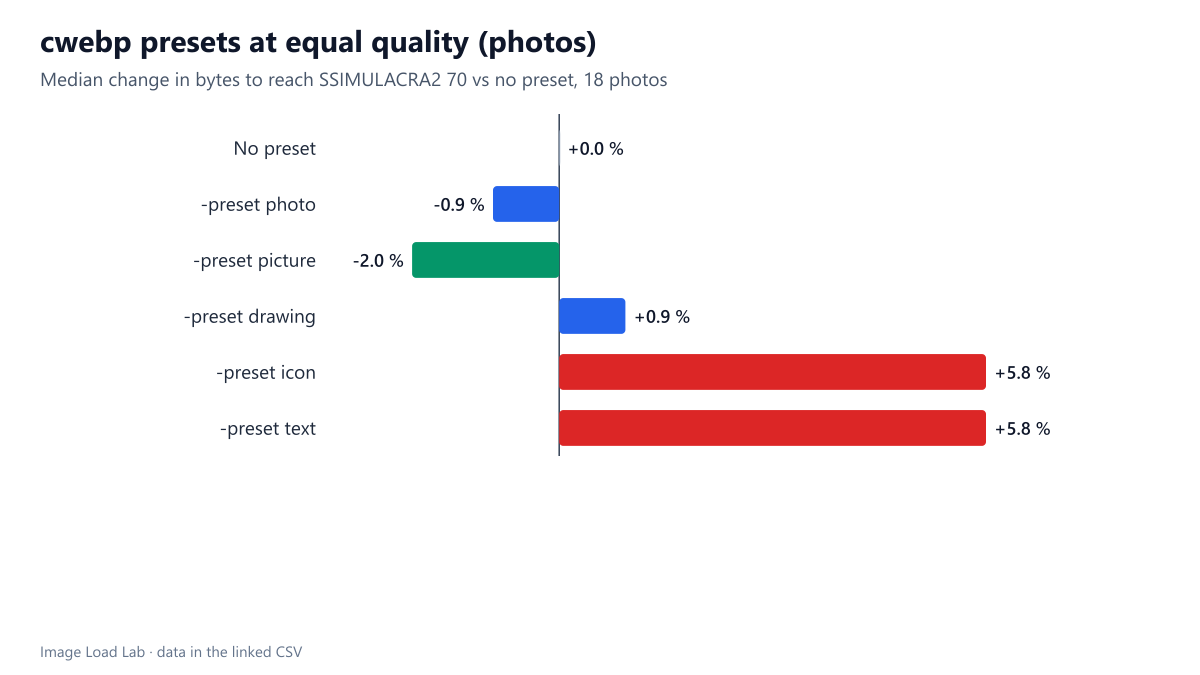
At equal quality, the best preset saved 2 % on photos. For the 18 photos whose ladders reached a score of 70 with every preset, -preset picture needed a median 2.0 % fewer bytes than no preset and -preset photo 0.9 % fewer. -preset drawing was 0.9 % larger. The icon and text presets needed 5.8 % more bytes for the same quality: they are tuned for something else.
| Images | Preset | Median KB at -q 75 | Size vs no preset | Median SSIMULACRA2 |
|---|---|---|---|---|
| Photos | No preset | 150.8 | – | 70.1 |
| -preset photo | 145.6 | −2.6 % | 69.5 | |
| -preset picture | 145.7 | −2.1 % | 69.4 | |
| -preset drawing | 154.9 | +2.3 % | 70.2 | |
| -preset icon | 155.6 | +2.6 % | 68.0 | |
| -preset text | 155.6 | +2.6 % | 68.0 | |
| Screenshots | No preset | 34.5 | – | 67.2 |
| -preset photo | 33.3 | −3.6 % | 66.9 | |
| -preset picture | 32.8 | −4.8 % | 67.0 | |
| -preset drawing | 35.9 | +4.1 % | 67.5 | |
| -preset icon | 37.4 | +8.3 % | 67.5 | |
| -preset text | 37.4 | +8.3 % | 67.5 | |
| Synthetic | No preset | 16.5 | – | 81.5 |
| -preset photo | 16.9 | −1.5 % | 79.7 | |
| -preset picture | 15.8 | −2.9 % | 80.1 | |
| -preset drawing | 17.1 | +3.0 % | 81.4 | |
| -preset icon | 17.2 | +3.5 % | 81.7 | |
| -preset text | 17.2 | +3.5 % | 81.7 |
-preset default is the same as no preset. Every file was byte-for-byte the same size, so the option name is a little misleading: it selects the encoder’s normal behaviour.
At the same quality number, presets mostly trade size for quality. At -q 75 on photos, photo made files 2.6 % smaller but scored 0.6 points lower; icon and text made them 2.6 % larger and scored 2.1 points lower, worse on both counts. On screenshots, picture saved 4.8 % at practically the same score (67.0 versus 67.2), while icon and text added 8.3 % for a 0.3-point gain.
What this means in practice
- Presets are fine-tuning, not a quality lever. The largest equal-quality gain we measured was 2 %. Choosing the right format (our format comparison) or the right quality setting (our quality equivalence table) matters far more.
- If you set one, use
pictureorphotofor photographic content. They were the only presets that saved bytes at equal quality. - Do not use
iconortextfor photos. They cost 5.8 % more for the same quality in our test. - Tools that wrap libwebp (sharp, image CDNs, WordPress plugins) often expose a preset option; leaving it at the default loses at most a couple of percent.
Check it on your own images
To see whether a preset helps your kind of images, encode a few of them with and without it at the same quality and compare sizes, then look at both files at 100 %:
cwebp -q 75 -m 4 photo.png -o none.webp
cwebp -preset picture -q 75 -m 4 photo.png -o picture.webp
cwebp -preset photo -q 75 -m 4 photo.png -o photo.webp
A preset that makes the file smaller at the same -q may also make it softer, as our scores showed, so compare quality as well as size before adopting one.
Practical conclusion
cwebp’s presets changed file sizes by only a few percent at equal visual quality: picture saved 2.0 % and photo 0.9 % on 20 photographs, while icon and text cost 5.8 %. Leave the preset alone unless you encode millions of images, and spend the effort on format and quality choices instead.
Limitations
cwebp 1.6.0 at -m 4 only; presets may interact differently with other effort levels. The screenshot and synthetic groups have four images each, too few for equal-quality interpolation at a common score, so for them we report results at the same quality number.
Data and files
Download cwebp-presets.csv (588 rows, 58.7 KB) · Method: testing methodology. Photos: image credits.