When Lighthouse Flags Oversized Images, and How Accurate Its Savings Are
Lighthouse 13.5 flagged a photo once it was about 8 % wider than its slot needed, not at 5 %. Its estimated savings were 14 to 29 % higher than what a real resize saved.
Older versions of Lighthouse had a separate audit called “Properly size images”. In Lighthouse 13 it became part of a single insight, “Improve image delivery”, which also covers formats and compression. How much larger than its slot can an image be before Lighthouse flags it, and how accurate is the saving it promises? We showed the same photo at ten file widths in one slot and compared Lighthouse’s estimates with real resizes.
The test
Each test page shows a CC0 market photo 360 CSS pixels wide. On Lighthouse’s default mobile profile (412-pixel screen, device pixel ratio 1.75), that slot needs 630 device pixels. The file was a MozJPEG at quality 80, 640 to 1920 pixels wide, plus one 1280-pixel AVIF. We ran Lighthouse 13.5.0 in Chrome 155.0.8059.82 and read the “Improve image delivery” insight: whether the image was listed and the bytes Lighthouse estimated could be saved by resizing. To check those estimates, we encoded the same photo at exactly 630 pixels in the same format and quality and measured the real difference. See our methodology.
Results
| JPEG width (q80) | Width vs needed (630 px) | File KB | Flagged | Lighthouse estimate |
|---|---|---|---|---|
| 640 px | 1.02× | 37.9 | no | – |
| 660 px | 1.05× | 40.2 | no | – |
| 680 px | 1.08× | 42.0 | yes | 6,087 bytes |
| 700 px | 1.11× | 44.3 | yes | 8,619 bytes |
| 720 px | 1.14× | 46.0 | yes | 11,034 bytes |
| 760 px | 1.21× | 49.9 | yes | 15,995 bytes |
| 800 px | 1.27× | 53.9 | yes | 20,961 bytes |
| 960 px | 1.52× | 69.6 | yes | 40,561 bytes |
| 1280 px | 2.03× | 103.4 | yes | 80,254 bytes |
| 1920 px | 3.05× | 174.3 | yes | 159,253 bytes |
The threshold sat between 5 % and 8 % too wide. Files of 640 and 660 pixels, 2 % and 5 % wider than needed, were not flagged. The 680-pixel file, 8 % wider, was flagged with an estimated saving of 6,087 bytes, and every larger file after it. The pattern matches a minimum saving of about 4 KB below which Lighthouse stays quiet: the 660-pixel file would have saved less than that.
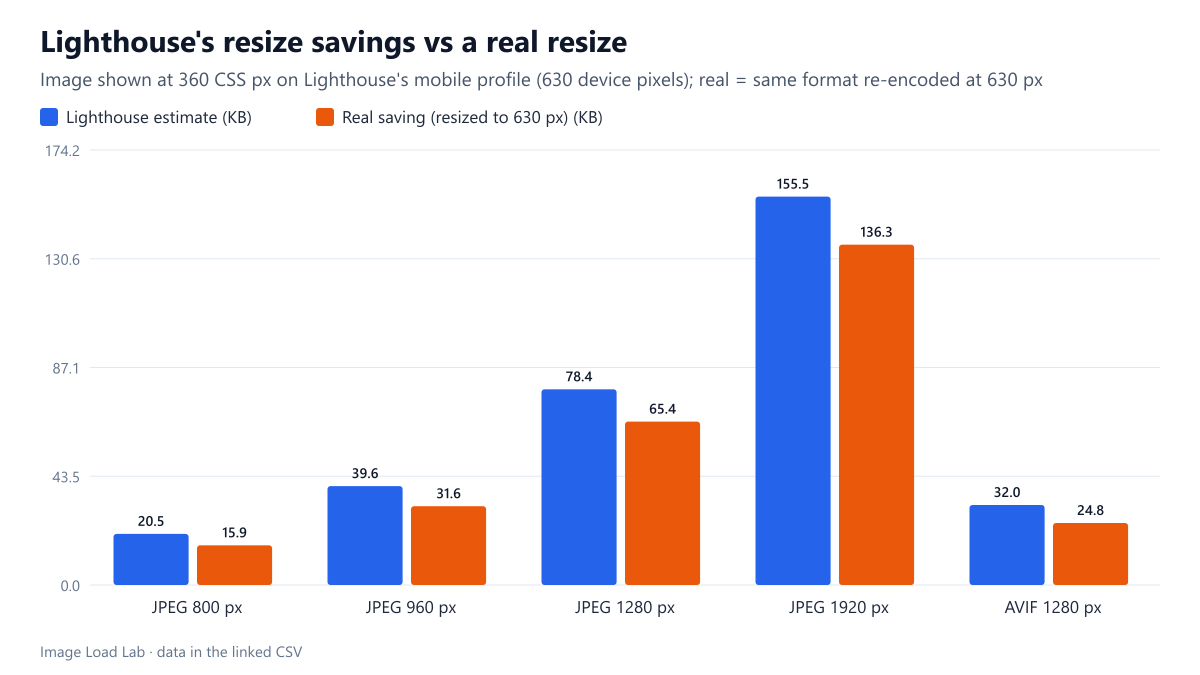
The estimates were consistently too high. Lighthouse’s numbers matched the share of the image’s pixels that are not displayed: for the 800-pixel file, 37.9 % of the pixels and 37.9 % of the bytes. Real files do not shrink in proportion to their pixels; our dimensions test found bytes growing with pixels to the power of about 0.84. So actually resizing to 630 pixels saved 14–29 % less than promised:
| Image | Width vs needed (630 px) | File KB | Lighthouse estimate | Real saving | Overestimate |
|---|---|---|---|---|---|
| JPEG 800 px | 1.27× | 53.9 | 20.5 KB | 15.9 KB | +29 % |
| JPEG 960 px | 1.52× | 69.6 | 39.6 KB | 31.6 KB | +26 % |
| JPEG 1280 px | 2.03× | 103.4 | 78.4 KB | 65.4 KB | +20 % |
| JPEG 1920 px | 3.05× | 174.3 | 155.5 KB | 136.3 KB | +14 % |
| AVIF 1280 px | 2.03× | 42.3 | 32.0 KB | 24.8 KB | +29 % |
How to read the insight
- Small oversizing is ignored. A file a few percent too wide will not appear, which is reasonable; chasing those bytes is rarely worth extra image sizes.
- Treat the estimate as an upper bound. In our test the real saving was 78–88 % of the estimate, closest for the most oversized files.
- The check is per device. On the desktop profile (1×), the same 360-pixel slot needs only 360 pixels, so many more files would be flagged; on a 3× phone, fewer.
- The fix is responsive images, not a single smaller file:
srcsetwith a correctsizes, as in our srcset and sizes test.
Practical conclusion
Lighthouse 13.5 flagged a photo once it was about 8 % wider than its slot needed (680 pixels for 630), not at 5 %. Its estimated savings followed the share of hidden pixels and were 14–29 % higher than what a real resize saved. Use the insight to find oversized images, and expect somewhat smaller gains than it reports.
Limitations
One photo, one slot and one run per width; the exact cut-off depends on the file’s size, since it appears to be a minimum number of bytes rather than a percentage. Lighthouse’s mobile profile only.
Data and files
Download lh-image-delivery.csv (18 rows, 0.9 KB) · Method: testing methodology. Photo: image credits.