oxipng Optimisation Levels: Bytes Saved vs Time
oxipng's default level 2 saved 12.6 % on screenshots in under a second per image. Higher levels added at most half a percent, and Zopfli one more percent for about a minute per file.
oxipng is a popular lossless PNG optimiser: it rewrites a PNG with better filters and compression without changing a single pixel. It has optimisation levels from -o 0 to -o 6 (plus max) and an optional, much slower Zopfli compressor. How many bytes does each level save, and how long does it take? We ran every level on eleven PNGs and timed each run.
The test
The images were four real screenshots of an earlier version of this site, four synthetic graphics generated by code and three transparent graphics generated by code. Each started as the PNG that sharp 0.35.5 writes by default (libvips with zlib level 6), which is what many image pipelines produce. We then ran oxipng 10.2.1 with --strip safe at -o 0 to -o 6 and at -o max --zopfli, each time on a fresh copy of the starting file. Each level was timed three times and the median kept; the very slow Zopfli runs were timed once. The machine has a 16-thread Intel Core i5-13400F, which oxipng uses in parallel. Every output is lossless, so only size and time are compared. See our methodology.
Results
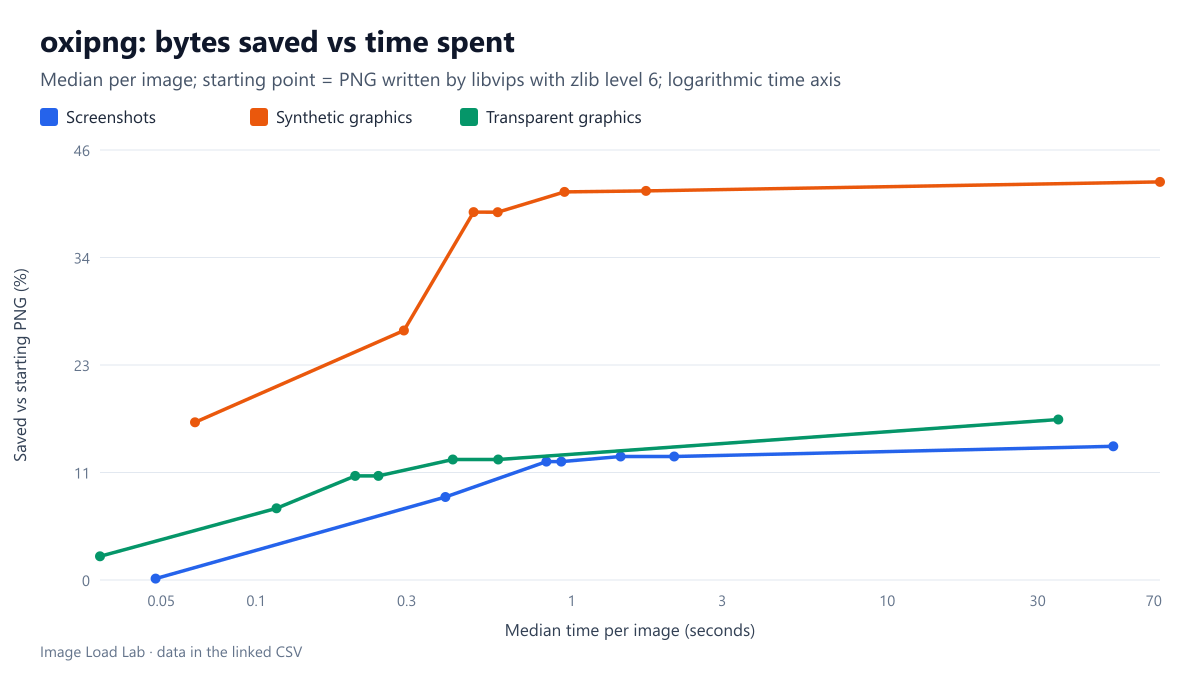
Level 2 did almost all the work. On the screenshots, -o 2 saved a median 12.6 % in 0.83 seconds per image. Going to -o 4 added half a percent (13.1 %) and took 1.4 seconds; -o 6 saved exactly the same as level 4 but took 2.1 seconds.
Zopfli bought one more percent for about a minute. -o max --zopfli reached 14.2 % on the screenshots, but each one took a median 52 seconds and up to 63 seconds. On the synthetic graphics it took a median 73 seconds, and the slowest image took 2.4 minutes, for 42.4 % instead of 41.3 % at level 4.
The image type mattered more than the level. Synthetic graphics with flat areas shrank by 39 % already at level 2, while screenshots and transparent graphics stayed around 11–13 %. Level 0, which only tries to reduce the colour type and bit depth, saved almost nothing on screenshots but up to 38 % on one synthetic image that needed far fewer colours than it was stored with.
| Images | oxipng option | Median saving | Range | Median time |
|---|---|---|---|---|
| Screenshots (4) | -o 0 | 0.1 % | 0.1–0.1 % | 0.05 s |
| -o 1 | 8.8 % | 8.1–10.1 % | 0.40 s | |
| -o 2 | 12.6 % | 12.0–13.8 % | 0.83 s | |
| -o 3 | 12.6 % | 12.0–13.8 % | 0.93 s | |
| -o 4 | 13.1 % | 12.4–14.7 % | 1.43 s | |
| -o 6 | 13.1 % | 12.4–14.7 % | 2.11 s | |
| -o max –zopfli | 14.2 % | 13.3–15.8 % | 52.09 s | |
| Synthetic (4) | -o 0 | 16.8 % | 0.1–37.9 % | 0.06 s |
| -o 1 | 26.6 % | 8.5–44.5 % | 0.29 s | |
| -o 2 | 39.1 % | 9.8–45.6 % | 0.49 s | |
| -o 3 | 39.1 % | 9.5–49.6 % | 0.58 s | |
| -o 4 | 41.3 % | 10.1–51.9 % | 0.95 s | |
| -o 6 | 41.4 % | 10.1–51.9 % | 1.72 s | |
| -o max –zopfli | 42.4 % | 10.4–54.3 % | 73.24 s | |
| Transparent (3) | -o 0 | 2.5 % | 0.1–12.6 % | 0.03 s |
| -o 1 | 7.6 % | 6.7–31.1 % | 0.12 s | |
| -o 2 | 11.1 % | 10.2–36.0 % | 0.21 s | |
| -o 3 | 11.1 % | 10.2–37.4 % | 0.24 s | |
| -o 4 | 12.8 % | 12.1–40.4 % | 0.42 s | |
| -o 6 | 12.8 % | 12.1–40.6 % | 0.58 s | |
| -o max –zopfli | 17.1 % | 13.3–42.5 % | 34.87 s |
Which level to use
- Build pipelines and upload hooks:
-o 2, oxipng’s default. It captured about 90 % of the possible saving in under a second per screenshot. - Assets optimised once and served for years (logos, interface sprites):
-o 4is still cheap; Zopfli can add another percent or so if you can wait a minute per file. - Never use Zopfli on user uploads or on demand. A minute of CPU per image is far too slow.
- Consider whether the image should be a PNG at all. A lossless PNG is still large; a palette PNG or lossless WebP saved far more in our other tests, and photos should never be PNG, as our PNG versus JPEG test shows.
Practical conclusion
oxipng’s default level 2 saved 12.6 % on screenshots and 39 % on synthetic graphics in under a second per image; higher levels added at most half a percent, and Zopfli about one more percent for roughly a minute per file. Use level 2 everywhere and reserve the slow settings for assets that are optimised once.
Limitations
Eleven images, one starting point (libvips zlib level 6; PNGs from other tools may already be better or worse compressed) and one machine. Times scale with the number of CPU threads; a single-core server will be several times slower at every level.
Data and files
Download oxipng-levels.csv (99 rows, 7.4 KB) · Method: testing methodology.