Palette PNG (Quantisation) vs Full-Colour PNG vs WebP
A 256-colour palette PNG made our screenshots 65 % smaller with a quality score above 90, smaller than lossless WebP. For transparent graphics, lossless WebP was smaller and exact.
Tools such as pngquant, TinyPNG and sharp’s palette option shrink PNG files by reducing them to at most 256 colours, a process called quantisation. The result is still a PNG, so it works everywhere, but it is no longer an exact copy. How much smaller do palette PNGs get, how close do they stay to the original, and are they better than WebP for screenshots and graphics? We tested four kinds of images at several quantisation settings.
The test
The images were four real screenshots of an earlier version of this site, four synthetic graphics generated by code (a gradient, a flat illustration, line art and a chart), three transparent graphics generated by code and six of our CC0 photos at 1600 pixels. Each was saved with sharp 0.35.5 as a full-colour PNG (compression level 9), as a palette PNG with libimagequant 2.4.1 at quality 100, 90, 80 and 70, as palette PNGs limited to 32 and 16 colours, and as lossless and lossy (quality 90) WebP for comparison. Every file was scored with SSIMULACRA2 against the source; transparent images were scored on a white background. See our methodology.
Results
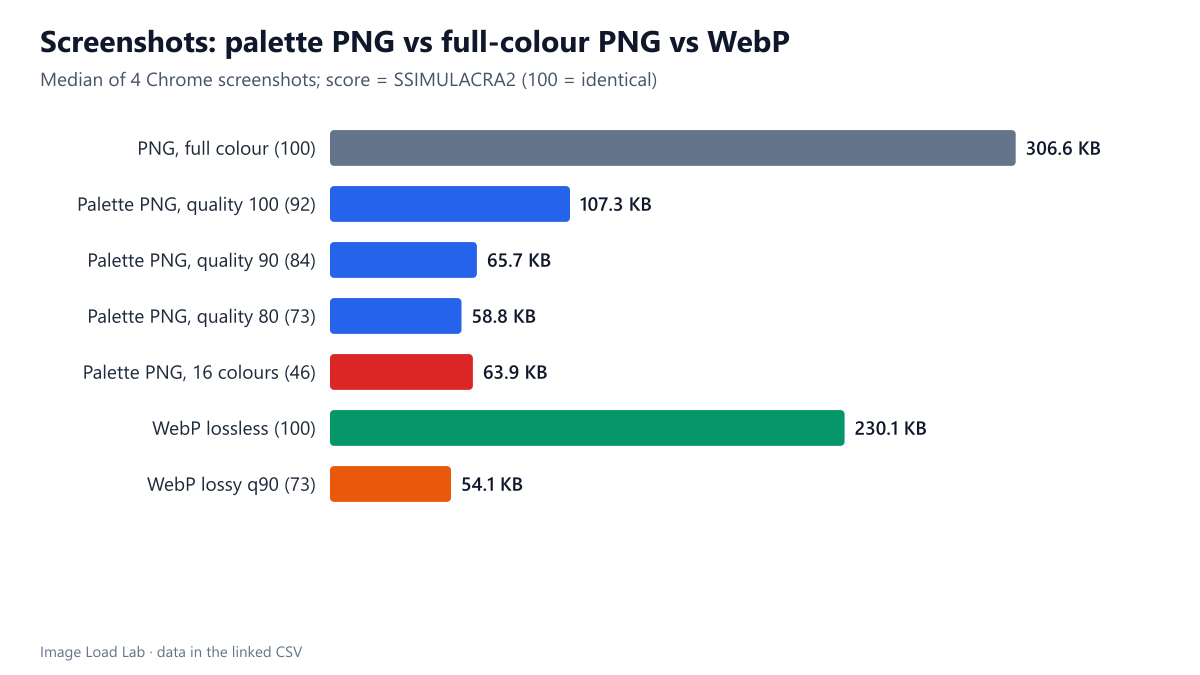
A palette PNG cut screenshots by 65 % while staying very close to the original. The four screenshots needed a median 306.6 KB as full-colour PNG and 107.3 KB as a palette PNG at quality 100, with a median score of 91.8 and no screenshot below 90.5. That is smaller than lossless WebP (230.1 KB), which keeps every pixel but saved only 24.9 %.
Lower quality settings saved more, up to a point. Quality 90 brought screenshots to 65.7 KB (78 % smaller) with a score of 84.3. Quality 80 and 70 saved only a little more (58.8 and 59.2 KB) while scores fell to 73.2 and 68.7, with one screenshot dropping to 58.1. Below quality 90 the trade stopped being worth it.
Against lossy WebP, palette PNG kept text cleaner for a few more kilobytes. Lossy WebP at quality 90 made the screenshots 54.1 KB with a score of 72.7; the palette PNG at quality 90 was 21 % larger but scored 84.3, because it keeps edges sharp and only shifts colours slightly.
| Images | Saved as | Median KB | vs full-colour PNG | Median SSIMULACRA2 | Lowest |
|---|---|---|---|---|---|
| Screenshots (4) | PNG, full colour | 306.6 | – | 100.0 | 100.0 |
| Palette PNG, quality 100 | 107.3 | −65.1 % | 91.8 | 90.5 | |
| Palette PNG, quality 90 | 65.7 | −78.0 % | 84.3 | 78.8 | |
| Palette PNG, quality 80 | 58.8 | −80.6 % | 73.2 | 58.1 | |
| Palette PNG, 16 colours | 63.9 | −80.5 % | 46.2 | 44.1 | |
| WebP lossless | 230.1 | −24.9 % | 100.0 | 100.0 | |
| WebP lossy q90 | 54.1 | −82.6 % | 72.7 | 69.3 | |
| Synthetic graphics (4) | PNG, full colour | 175.1 | – | 100.0 | 100.0 |
| Palette PNG, quality 100 | 156.5 | −57.7 % | 92.4 | 81.3 | |
| Palette PNG, quality 90 | 104.4 | −70.3 % | 90.6 | 73.6 | |
| Palette PNG, quality 80 | 87.1 | −72.8 % | 90.3 | 77.3 | |
| Palette PNG, 16 colours | 58.7 | −75.9 % | 89.4 | 43.5 | |
| WebP lossless | 112.0 | −65.8 % | 100.0 | 100.0 | |
| WebP lossy q90 | 24.5 | −60.5 % | 84.4 | 80.2 | |
| Transparent graphics (3) | PNG, full colour | 31.6 | – | 100.0 | 100.0 |
| Palette PNG, quality 100 | 13.5 | −57.4 % | 92.3 | 88.8 | |
| Palette PNG, quality 90 | 14.5 | −61.6 % | 84.8 | 83.9 | |
| Palette PNG, quality 80 | 20.9 | −58.0 % | 78.4 | 56.9 | |
| Palette PNG, 16 colours | 21.0 | −71.2 % | 63.3 | 27.7 | |
| WebP lossless | 13.1 | −43.0 % | 100.0 | 100.0 | |
| WebP lossy q90 | 20.1 | −36.4 % | 88.5 | 87.3 | |
| Photos (6) | PNG, full colour | 2,517.8 | – | 100.0 | 100.0 |
| Palette PNG, quality 100 | 885.6 | −65.4 % | 74.3 | 69.1 | |
| Palette PNG, quality 90 | 841.5 | −65.4 % | 74.3 | 69.1 | |
| Palette PNG, quality 80 | 809.3 | −67.7 % | 74.3 | 69.1 | |
| Palette PNG, 16 colours | 353.4 | −86.0 % | 20.4 | 12.3 | |
| WebP lossless | 1,967.2 | −26.2 % | 100.0 | 100.0 | |
| WebP lossy q90 | 375.9 | −86.3 % | 82.1 | 76.3 |
On transparent graphics, lossless WebP won. The three transparent test images were 13.5 KB as palette PNG (score 92.3) and 13.1 KB as lossless WebP, an exact copy. On photos, a 256-colour palette was the wrong tool: files were still 886 KB at a score of 74.3, while lossy WebP at quality 90 was 376 KB with a score of 82.1.
A detail about sharp’s colour limit
In sharp 0.35.5, asking for 32, 64 or 128 colours produced exactly the same file as 256 colours. Only 16 colours or fewer changed the output, presumably because the setting is applied through the PNG’s bit depth (16 colours fit in 4 bits). Sixteen colours was far too few for our screenshots: the score fell to 46.2. Control the size with the quality option instead.
What to use
- Screenshots and UI graphics that must stay PNG: palette PNG at quality 90–100. It cut sizes by 65–78 % in our test with scores of 84–92.
- Transparent logos and icons: lossless WebP was smaller than palette PNG and exact. Our transparency test has more on this.
- Photos: never PNG, palette or not. See our test of PNG for photos.
- Check gradients: a 256-colour palette can band smooth gradients; our synthetic gradient dropped to a score of 81.3 even at quality 100, while the other graphics stayed above 92.
Practical conclusion
A palette PNG at quality 100 made our screenshots 65 % smaller with a quality score above 90, beating lossless WebP on size; at quality 90 it was 78 % smaller and cleaner than lossy WebP at a similar size. For transparent graphics, lossless WebP was the better choice, and for photos, neither PNG option made sense.
Limitations
Small groups of test images, one quantiser (libimagequant via sharp, with dithering on) and one compression setting. Standalone pngquant exposes the same library with different defaults. Screenshots show an older design of this site at 1× density.
Data and files
Download png-palette.csv (153 rows, 15.6 KB) · Method: testing methodology. Photos: image credits.