PNG for Photos: How Much Bigger Than JPEG?
Saved as PNG, our 20 photos were a median 14.5 times the size of a MozJPEG at quality 85. Maximum PNG compression and lossless WebP still left them 8 to 10 times larger.
Photos saved as PNG are one of the most common causes of heavy pages: a screenshot tool, a design export or a “save for web” default produces a PNG, and it goes onto the page unchanged. PNG is lossless, which sounds like a quality advantage. How much does that cost for a photograph, and does squeezing the PNG help? We saved 20 photos as default PNG, maximally compressed PNG, lossless WebP, JPEG and lossy WebP.
The test
The 20 photos are our CC0 and public-domain corpus at 1600 pixels on the long edge (see image credits). Each was saved with sharp 0.35.5 as a PNG with default settings (zlib level 6), as a PNG with maximum compression (level 9 with adaptive filtering), as lossless WebP, as MozJPEG at quality 85 and as WebP at quality 80. We compared sizes with the JPEG of the same photo and scored the lossy files with SSIMULACRA2. A first run of this test used sharp’s effort option for the “maximum” PNG; in sharp that option silently switches to a 256-colour palette, which is lossy, so we discarded that run and repeated it without the option. See our methodology.
Results
| Saved as | Median KB | Times the JPEG q85 size (range) | Median SSIMULACRA2 |
|---|---|---|---|
| PNG (sharp default) | 3,095.4 | 14.49× (7.9–32.9×) | 100.0 |
| PNG, max compression | 2,342.7 | 9.89× (6.8–19.2×) | 100.0 |
| WebP lossless | 1,773.0 | 7.78× (4.5–15.2×) | 100.0 |
| JPEG q85 (MozJPEG) | 225.7 | 1.00× (1.0–1.0×) | 78.4 |
| WebP q80 | 186.4 | 0.77× (0.5–1.1×) | 74.1 |
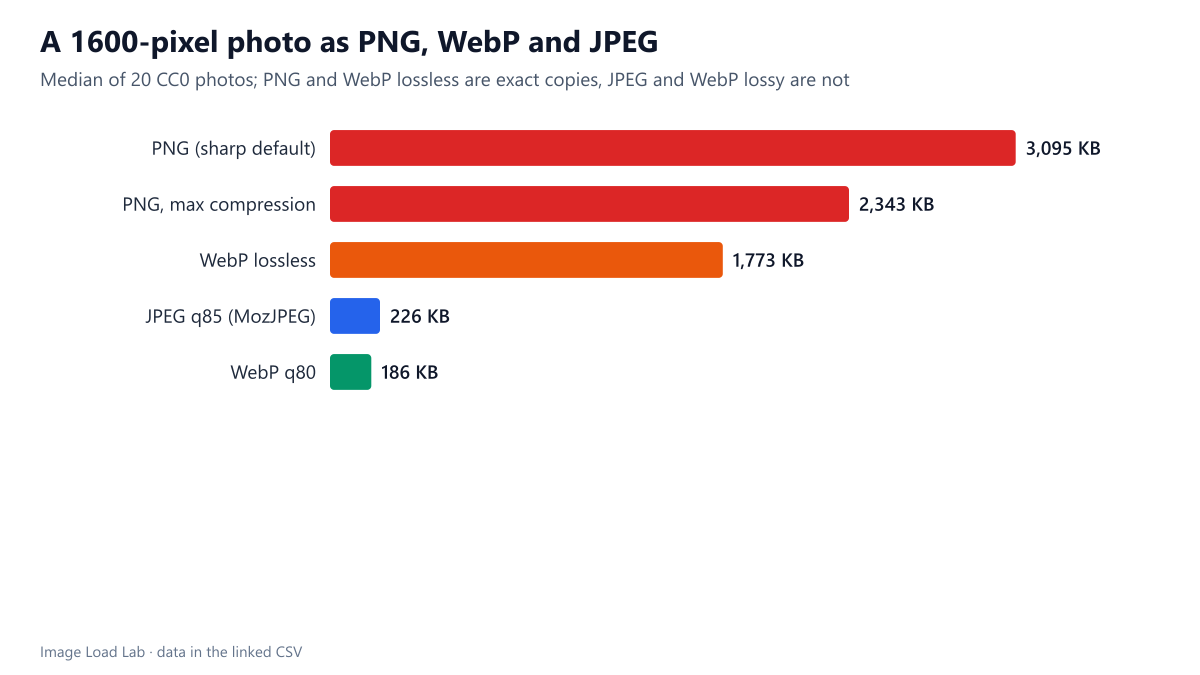
A default PNG photo was 14.5 times the size of a good JPEG. The median photo weighed 3,095 KB as PNG and 226 KB as MozJPEG quality 85. Depending on the photo, the PNG was between 7.9 and 32.9 times larger. The largest ratios came from photos with big smooth areas, such as a flower (32.9 times), a coffee cup and a desert scene, which JPEG compresses especially well. The smallest came from heavily textured photos such as snow, a waterfall and carved stone, which are expensive in every format.
Maximum compression helped, but not enough. Compression level 9 with adaptive filtering cut the median PNG to 2,343 KB, still 9.9 times the JPEG. Lossless WebP did better at 1,773 KB, 7.8 times the JPEG. Lossless formats have to store every grain of noise and texture exactly; there is no setting that makes them competitive for photographs.
The lossy files looked fine at a fraction of the size. The JPEG at quality 85 scored a median 78.4 on SSIMULACRA2, a level at which differences are hard to see at normal viewing size. WebP at quality 80 was smaller still (186 KB, 0.77 times the JPEG) with a score of 74.1.
What to do
- Convert photo PNGs to JPEG, WebP or AVIF before publishing. On a page with three hero-sized photos, PNG would mean about 9 MB instead of under 700 KB.
- Look for PNGs in your media library. In WordPress, an uploaded PNG photo also produces PNG thumbnails; our upload workflow test shows what WordPress generates from each upload.
- Keep PNG (or lossless WebP) for screenshots, diagrams and graphics with text, where lossy artefacts are visible. Even there, a palette PNG or near-lossless WebP is often much smaller.
- For the best photo format, see our JPEG, WebP and AVIF comparison, where AVIF needed 29 % fewer bytes than MozJPEG at the same quality.
Practical conclusion
For photographs, PNG was 7.9 to 32.9 times larger than a MozJPEG at quality 85 (median 14.5 times), and even maximum compression or lossless WebP left files 8 to 10 times larger. Publish photos in a lossy format; keep lossless formats for graphics.
Limitations
PNG optimisers such as oxipng saved 13–14 % on our screenshots in our oxipng test; we did not run them on these photos, but a saving of that size would not change the order of magnitude. The quality scores measure difference from the lossless source, not whether a difference is visible at a given display size.
Data and files
Download png-for-photos.csv (120 rows, 11.6 KB) · Method: testing methodology. Photos: image credits.