Sharpening After Resizing: What It Costs in File Size
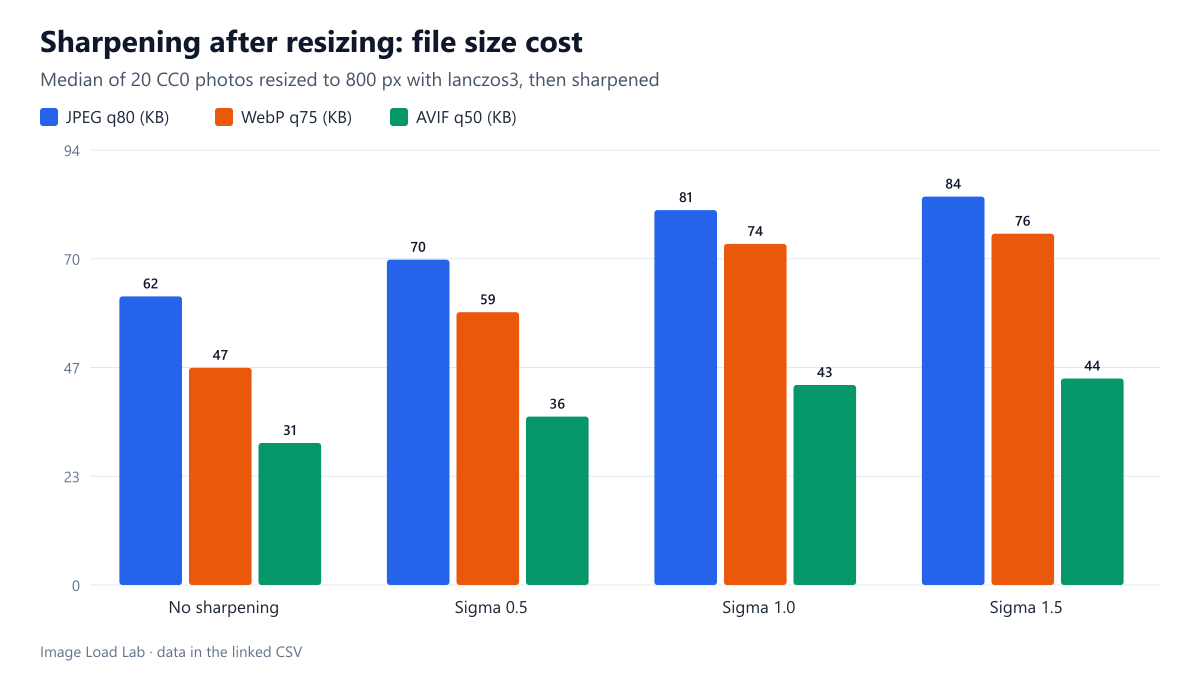
Light sharpening at sigma 0.5 made resized photos 14 to 22 % larger, and sigma 1.0 added 29 to 47 %, with WebP and AVIF hit harder than JPEG.
Downscaled photos can look soft, and many image pipelines add a sharpening step after resizing to bring back crispness. Sharpening increases contrast along edges and in fine texture, and fine detail is exactly what lossy compression finds expensive. How much larger does sharpening make the final JPEG, WebP or AVIF file? We resized 20 photos, sharpened them at three strengths and compressed each version in three formats.
The test
Each of our 20 CC0 photos was reduced from 1600 to 800 pixels with sharp 0.35.5’s default lanczos3 kernel, then sharpened with sharp’s sharpen({ sigma }) at sigma 0.5, 1.0 and 1.5, or left unsharpened. Each of the four versions was saved as MozJPEG quality 80, WebP quality 75 and AVIF quality 50, the settings that give similar visual quality in our quality equivalence test. We recorded file sizes, measured the sharpness of each version before compression (variance of the Laplacian) and scored each compressed file with SSIMULACRA2 against its own uncompressed version, which tells us how well each encoder coped with the sharpened detail. See our methodology.
Results
| Sharpening | JPEG q80 (change) | WebP q75 (change) | AVIF q50 (change) | Sharpness index |
|---|---|---|---|---|
| No sharpening | 62.2 KB (+0.0 %) | 46.8 KB (+0.0 %) | 30.6 KB (+0.0 %) | 1,047 |
| Sigma 0.5 | 70.1 KB (+14.2 %) | 58.8 KB (+22.4 %) | 36.3 KB (+19.8 %) | 2,420 |
| Sigma 1.0 | 80.8 KB (+29.3 %) | 73.5 KB (+47.4 %) | 43.1 KB (+43.6 %) | 3,740 |
| Sigma 1.5 | 83.7 KB (+32.9 %) | 75.7 KB (+51.6 %) | 44.5 KB (+48.1 %) | 3,615 |
Even light sharpening cost 14–22 %. Sigma 0.5 made the median file 14.2 % larger as JPEG, 22.4 % larger as WebP and 19.8 % larger as AVIF. At sigma 1.0 the increases reached 29.3 %, 47.4 % and 43.6 %. Sigma 1.5 added only a few percent more, and the sharpness index did not rise further beyond sigma 1.0.
WebP and AVIF paid more than JPEG. The modern formats save bytes largely by smoothing fine texture that the eye does not miss. Sharpening adds exactly that kind of texture, so their advantage over JPEG shrank: unsharpened, the median WebP was 25 % smaller than the JPEG; at sigma 1.0 it was only 9 % smaller.
Sharpened images were also harder to compress well. Against their own uncompressed versions, the AVIF files scored 67.4 without sharpening and 62.3 at sigma 1.0: the encoder could not keep all the added edge contrast at the same quality setting. For JPEG the score fell from 74.4 to 70.9.
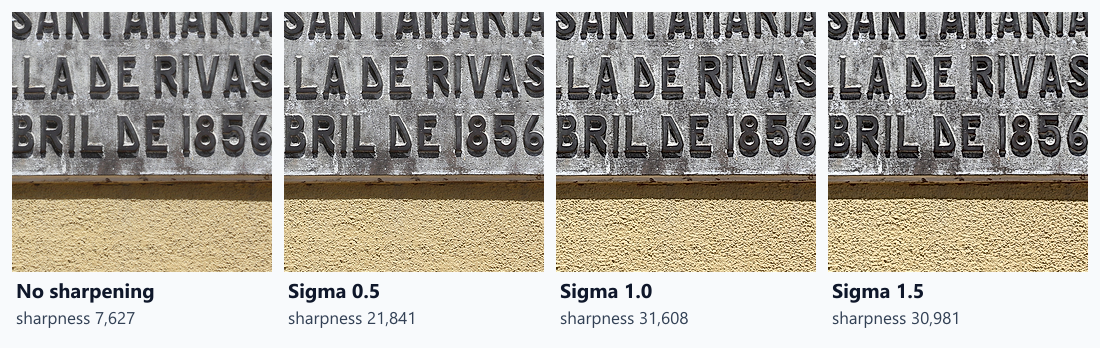
The crops show what the bytes buy: the lettering and the stone texture get crisper at each step up to sigma 1.0.
What this means in practice
- Sharpen deliberately, not by default. A pipeline that sharpens every resized image adds 14–47 % to every file, depending on strength and format.
- If you do sharpen, use a light setting. Sigma 0.5 gave a visible improvement at about half the cost of sigma 1.0.
- Consider the resize kernel first. lanczos3, sharp’s default, already produces crisp results; our resize kernel test found it sharper than most alternatives.
- Judge sharpening at the size the image is shown. A file viewed at 100 % in an editor looks different from the same file scaled into a page slot by the browser.
Check it on your own photos
This sharp snippet writes the same resized photo with and without light sharpening, so you can compare file sizes and judge the look at the size the image is shown:
// save as compare.mjs and run: node compare.mjs
import sharp from 'sharp';
const small = sharp('photo.jpg').resize({ width: 800 });
await small.clone().webp({ quality: 75 }).toFile('plain.webp');
await small.clone().sharpen({ sigma: 0.5 }).webp({ quality: 75 }).toFile('sharpened.webp');
If the sharpened file is more than about a fifth larger and the difference is hard to see in the page, leave sharpening out.
Practical conclusion
Sharpening after resizing made our photos 14–22 % larger at sigma 0.5 and 29–47 % larger at sigma 1.0, with WebP and AVIF hit hardest. If your photos look acceptable without it, skip the step; if not, keep the strength low.
Limitations
One sharpening method (sharp’s unsharp mask with default thresholds), one output size and one quality setting per format. Whether the sharpened versions look better is a matter of taste that our metrics do not measure; the scores only compare each file with its own uncompressed version.
Data and files
Download sharpen-after-resize.csv (240 rows, 33.9 KB) · Method: testing methodology. Photos: image credits.