MozJPEG vs Default JPEG Settings: 20 Photos at Equal Quality
At the same SSIMULACRA2 score, MozJPEG settings saved a median 15.1 % over sharp's default JPEG settings, with every photo at least 10.7 % smaller, for about four times the encoding time.
Image libraries such as sharp can write JPEG in two styles: the classic settings that most software has used for decades, or MozJPEG’s tuned settings, switched on in sharp with a single option, mozjpeg: true. MozJPEG promises smaller files at the same visual quality. How much smaller on real photographs, and what does it cost in encoding time? We encoded 20 photos at nine quality settings with both and compared them at equal quality, not at equal quality numbers.
The test
Our corpus is 20 CC0 and public-domain photographs from Wikimedia Commons, each resized to 1600 pixels on the long edge and kept as a lossless reference (listed on the image credits page). Each photo was saved with sharp 0.35.5 at quality 40, 50, 60, 70, 75, 80, 85, 90 and 95, once with sharp’s default JPEG options (baseline, standard quantisation tables, no trellis quantisation) and once with mozjpeg: true, which turns on trellis quantisation, overshoot deringing, optimised progressive scans and a different quantisation table. Every file was scored with SSIMULACRA2 against the reference, and for each photo we interpolated the file size needed to reach scores of 60, 70 and 80. Encoding time is the median per photo on our 16-thread desktop. The methodology page explains the metric.
Results
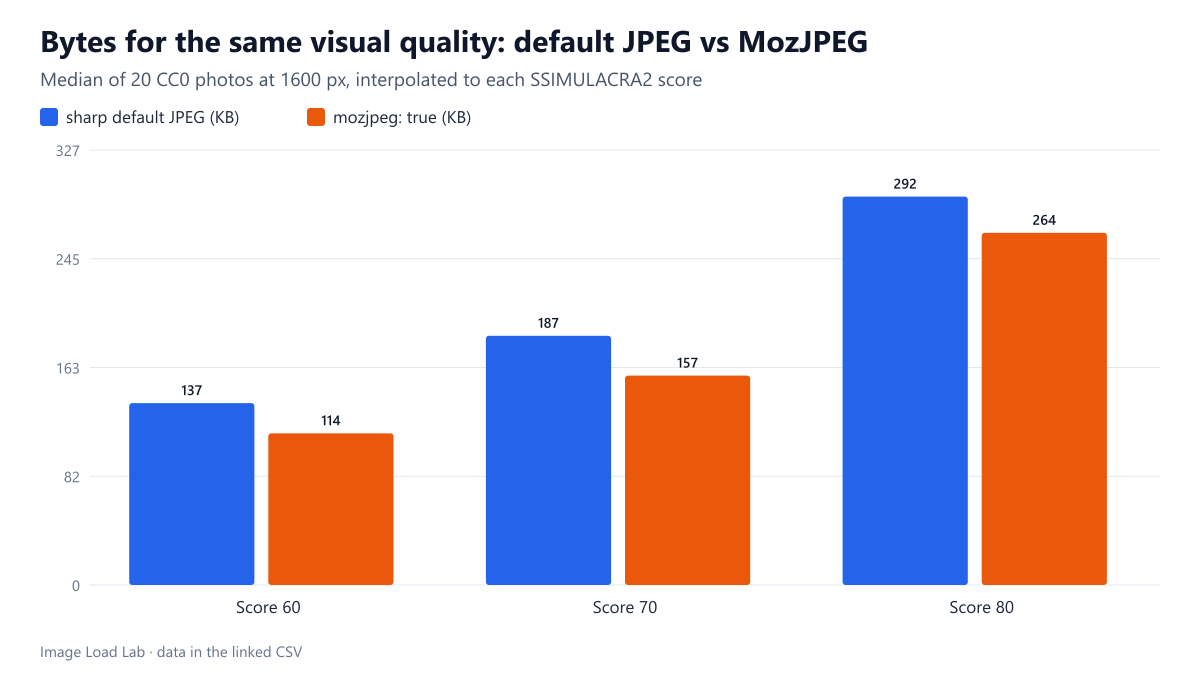
At equal quality, MozJPEG saved a median 15.1 %. To reach a SSIMULACRA2 score of 70, the median photo needed 187.1 KB with the default settings and 157.2 KB with MozJPEG. Every one of the 20 photos was smaller, by between 10.7 % (a detailed bird photo) and 25.2 % (a desert scene with large smooth areas). The saving was larger at lower quality (16.8 % at a score of 60, for the 17 photos whose ladder reached it) and smaller at higher quality (11.3 % at 80).
| Photo | Default settings (KB) | mozjpeg: true (KB) | Change |
|---|---|---|---|
| desert | 116.1 | 86.9 | −25.2 % |
| forest | 127.4 | 99.7 | −21.8 % |
| landscape | 127.7 | 100.3 | −21.4 % |
| architecture | 145.7 | 115.7 | −20.6 % |
| coffee | 81.0 | 65.4 | −19.3 % |
| market | 116.4 | 94.7 | −18.6 % |
| food | 149.2 | 122.6 | −17.8 % |
| animal-fur | 200.7 | 166.8 | −16.9 % |
| bicycle | 144.5 | 121.3 | −16.1 % |
| city-night | 225.6 | 191.1 | −15.3 % |
| sunset | 173.5 | 147.7 | −14.9 % |
| flower | 54.1 | 46.0 | −14.8 % |
| snow | 505.4 | 431.5 | −14.6 % |
| car | 255.9 | 221.3 | −13.5 % |
| beach-sky | 204.0 | 176.7 | −13.4 % |
| interior | 400.5 | 348.6 | −12.9 % |
| texture-rock | 386.3 | 336.6 | −12.9 % |
| waterfall | 543.0 | 473.3 | −12.8 % |
| street-sign | 491.3 | 429.1 | −12.7 % |
| bird | 329.5 | 294.3 | −10.7 % |
The same quality number does not mean the same quality. At quality 75, the default encoder produced a median 204.7 KB scoring 74.0, while MozJPEG produced 161.0 KB scoring 72.4. Comparing files at the same number therefore exaggerates MozJPEG’s advantage a little, because MozJPEG at a given number is slightly softer. The equal-quality figures above remove that bias.
MozJPEG is about four to five times slower. At quality 75 the median encode took 29.1 ms with default settings and 120.6 ms with MozJPEG; at quality 85, 29.9 ms and 144.7 ms. On a fast desktop that is still a fraction of a second per photo, but on a busy shared server processing every size of every upload it adds up.
What this means in practice
- For images encoded once (a build step, an upload pipeline, a CDN that caches results), MozJPEG settings are close to free bytes: 11–17 % less at the same visual quality, for every photo we tested.
- Re-tune the quality number when switching. MozJPEG reached the default encoder’s quality at a slightly higher setting; at a score of 70 the median MozJPEG photo needed quality 72.5. Our quality equivalence table lists the settings for each score.
- Compare against modern formats too. In our format comparison, AVIF needed 29.4 % fewer bytes than MozJPEG at the same score, a larger step than MozJPEG’s gain over default JPEG.
- Progressive output comes with it. MozJPEG’s scan optimisation makes progressive JPEGs. Our test of progressive versus baseline JPEG isolates how much of the saving comes from that alone.
Practical conclusion
Turn on mozjpeg: true (or use MozJPEG’s cjpeg) wherever JPEGs are encoded ahead of time. It saved a median 15.1 % at equal visual quality on 20 photographs, with no photo below a 10 % saving, at the cost of about four times more encoding time.
Limitations
Results are for sharp 0.35.5’s bundled MozJPEG build and its default options; other JPEG encoders (for example the ones built into PHP’s GD or ImageMagick) were not tested here. Quality was judged by one metric, SSIMULACRA2, at one image size. Interpolation between quality steps introduces small errors.
Data and files
Download mozjpeg-vs-default.csv (360 rows, 40.3 KB) · Method: testing methodology. Photos: image credits.