Progressive vs Baseline JPEG: File Size and What Visitors See
Progressive JPEGs were 2.8 to 4.3 % smaller at equal quality. On a slow connection they showed the whole image at 1.6 s, while baseline had drawn half its height at 4.6 s.
A JPEG can be saved in two orders. A baseline JPEG stores the image top to bottom, so a slow download draws it like a blind being lowered. A progressive JPEG stores a rough version of the whole image first and refines it in later passes, so the full picture appears early and sharpens. Does progressive encoding change the file size, and how differently do the two load on a slow connection? We measured both on 20 photos and filmed one of them loading.
The test
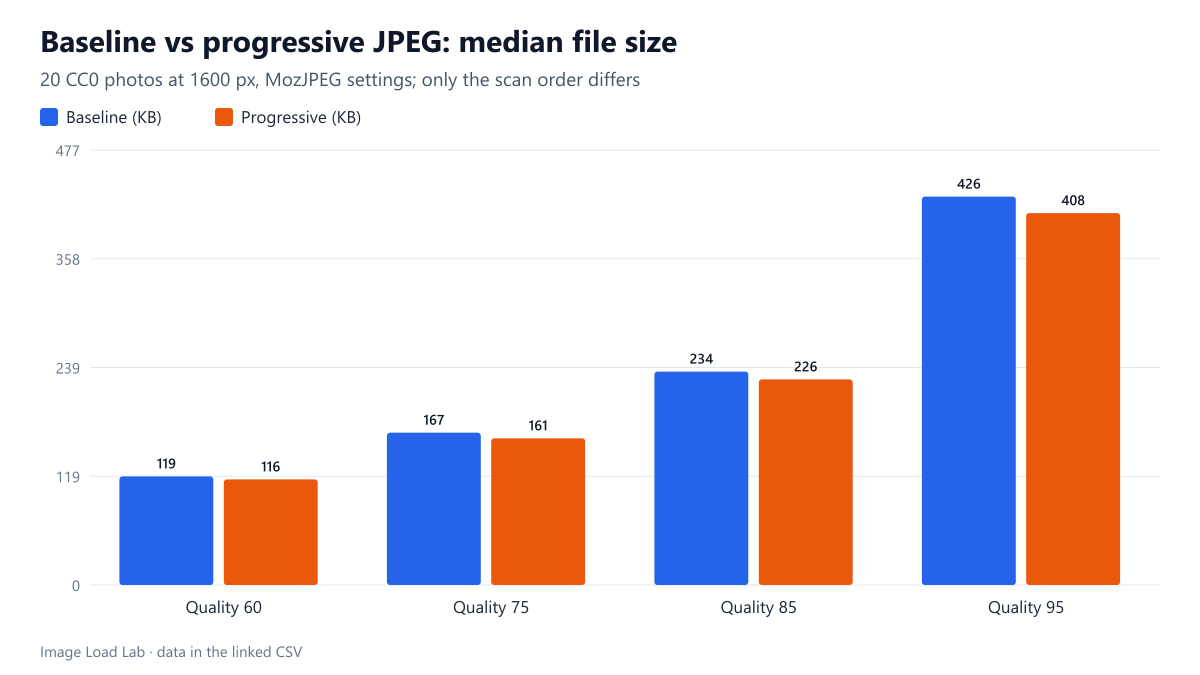
For file size, we encoded our 20 CC0 test photos at 1600 pixels wide with sharp 0.35.5 using MozJPEG settings (trellis quantisation, overshoot deringing, quantisation table 3), at qualities 60, 75, 85 and 95. Each was saved once as baseline and once as progressive with optimised scans, and we scored every file with SSIMULACRA2.
For rendering, we saved a 1200-pixel photo of a street sign both ways at quality 85 and displayed it at 600 × 400 CSS pixels. We loaded each file three times in Chrome 155.0.8059.82 over a slow connection (400 kbit/s, 150 ms latency) and took a screenshot about every 100 ms. For each load, we recorded when the first part of the image appeared and when half of the image area had been painted. See our methodology.
File size: progressive was slightly smaller
| Quality | Baseline, median KB | Progressive, median KB | Median change | Range over 20 photos | Photos smaller as progressive | SSIMULACRA2 (baseline / progressive) |
|---|---|---|---|---|---|---|
| 60 | 119.2 | 115.9 | −3.2 % | −7.8 to +0.0 % | 19 of 20 | 62.2 / 62.2 |
| 75 | 167.2 | 161.0 | −3.3 % | −5.7 to −0.2 % | 20 of 20 | 72.3 / 72.4 |
| 85 | 234.2 | 225.7 | −2.8 % | −5.4 to −0.7 % | 20 of 20 | 78.4 / 78.4 |
| 95 | 426.3 | 408.2 | −4.3 % | −6.6 to −2.2 % | 20 of 20 | 86.7 / 86.7 |
Progressive files were 2.8 to 4.3 % smaller at the median, depending on quality, with identical SSIMULACRA2 scores. At quality 75, 20 of 20 photos were smaller as progressive; at quality 60, 19 of 20, and the last one was within 17 bytes. The pixels are the same; only the order and coding of the data differ, which lets the encoder compress a little better.
Encoding took longer. The median encode time was 153 ms per photo for progressive against 97 ms for baseline. That is irrelevant for files encoded once at upload, but it adds up for on-the-fly image services.
Rendering: the whole picture early
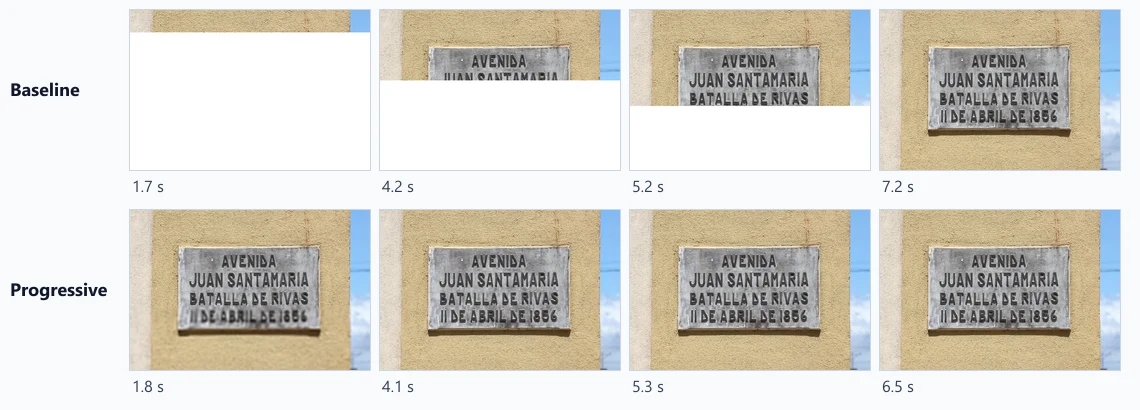
| JPEG | File size | Something visible | Half of the image area painted | Fully loaded |
|---|---|---|---|---|
| baseline | 327 KB | 1.6 s | 4.6 s | 7.1 s |
| progressive | 316 KB | 1.6 s | 1.6 s | 7.0 s |
Both started drawing at about the same time, 1.6 seconds after navigation, when the first data arrived.
The progressive JPEG covered the whole area at once. Its first pass painted the full image in soft detail, so “half the area painted” was reached at 1.6 seconds. The baseline JPEG reached half its height only at 4.6 seconds, and the bottom of the sign stayed blank until near the end.
Both finished at about 7 seconds. The progressive file was 11 KB smaller and completed about 0.1 second earlier, within the variation between loads. Progressive encoding does not make the image complete sooner; it makes something useful visible sooner.
A note on Largest Contentful Paint
Chrome currently records an image’s LCP time when the image has finished loading, not at its first progressive pass, so progressive encoding should not be expected to lower your LCP number by itself. We did not measure LCP in this test. Its benefit is perceived speed: on slow connections, visitors see the whole picture seconds earlier. Our placeholder test covers a related technique.
What to do
- Save large JPEGs as progressive. In our tests they were a few percent smaller at the same quality and looked complete much sooner on a slow connection.
- Check your tools. MozJPEG’s command-line encoder writes progressive by default; sharp, ImageMagick and many CMS pipelines need an option. WordPress saves the sizes it generates as baseline JPEGs on this site, as our WordPress quality test found.
- Small images gain little. A thumbnail that arrives in one or two network round trips shows no visible difference between the two orders.
- Compare with modern formats too. At equal quality, AVIF saved far more than the 3 % progressive encoding saves, as our format comparison shows. We did not test how WebP and AVIF render while loading.
Practical conclusion
Progressive JPEGs were 2.8–4.3 % smaller than baseline at equal quality across 20 photos. On a 400 kbit/s connection, the progressive version showed the whole image in soft detail from 1.6 seconds, while the baseline version had painted only half its height by 4.6 seconds. Both finished at about 7 seconds. Use progressive encoding for large JPEGs; just do not expect a better LCP from it alone.
Limitations
File sizes from one encoder with MozJPEG settings; rendering from one photo, three loads per version, Chrome only, with screenshots spaced by roughly 100 ms plus capture time. The “area painted” measure counts covered pixels, not visual quality.
Data and files
Download progressive-jpeg.csv (160 rows, 16.4 KB) · Download progressive-render.csv (6 rows, 0.3 KB) · Method: testing methodology. Photos: image credits.