What WordPress Writes When You Upload a Photo: Quality, Sampling and Metadata
On this host WordPress made every JPEG size with ImageMagick at exactly quality 82, baseline, 4:4:4 and without metadata, and its WebP sizes with GD. The 4:4:4 sampling cost 15 to 18 % extra.
When you upload a photo, WordPress writes up to seven new files: thumbnails and intermediate sizes for responsive images. You never see the settings it uses. What quality, colour sampling and metadata do those generated files have, and which software creates them? We opened every file WordPress produced on this site from a JPEG and a WebP upload and read their internals.
The test
We uploaded a CC0 landscape photo to this WordPress 7.1.2 site twice: as the original 5184 × 3456 camera JPEG (2.8 MB) and as a 1600-pixel WebP made with sharp. Then we downloaded every generated size and inspected it with Pillow and libwebp’s webpinfo: JPEG quality was estimated by matching each file’s luminance quantisation table against the standard IJG tables, and we recorded chroma subsampling, baseline or progressive encoding, EXIF and ICC data; for WebP, the bitstream type and metadata chunks. WordPress’s Site Health page told us which image libraries the server offers. See our methodology.
Results
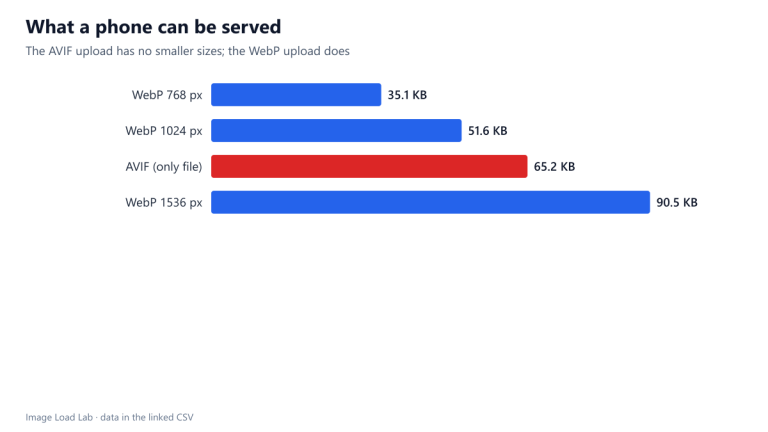
Two libraries share the work. Site Health lists ImageMagick 6.9.10 (through Imagick) as the active editor and GD as the alternative. ImageMagick’s list of supported formats on this host includes JPEG and PNG but neither WebP nor AVIF; GD supports WebP. So WordPress used ImageMagick for the JPEG sizes and GD for the WebP sizes, and for the AVIF upload neither could help, which is why no sizes were generated for it, as our AVIF upload test found.
Every generated JPEG was quality 82. The luminance quantisation tables of all seven JPEG sizes matched the standard table for quality 82 exactly, WordPress’s documented default. The files were baseline (not progressive) and carried no EXIF data and no ICC profile.
The JPEGs kept full colour resolution (4:4:4). None of the generated sizes used chroma subsampling. The uploaded camera file was itself 4:4:4, so the generated files may simply follow the source; we did not test a 4:2:0 upload. On this photo, saving at quality 82 with 4:4:4 cost 15–18 % more bytes than 4:2:0 for about 2.3 points of SSIMULACRA2:
| Width | Quality 82, 4:4:4 (KB) | Quality 82, 4:2:0 (KB) | Extra bytes for 4:4:4 | SSIMULACRA2 4:4:4 | SSIMULACRA2 4:2:0 |
|---|---|---|---|---|---|
| 768 px | 56.7 | 48.7 | +16.6 % | 80.5 | 78.0 |
| 1024 px | 94.4 | 80.5 | +17.2 % | 80.7 | 78.4 |
| 1536 px | 197.8 | 167.6 | +18.0 % | 80.1 | 77.9 |
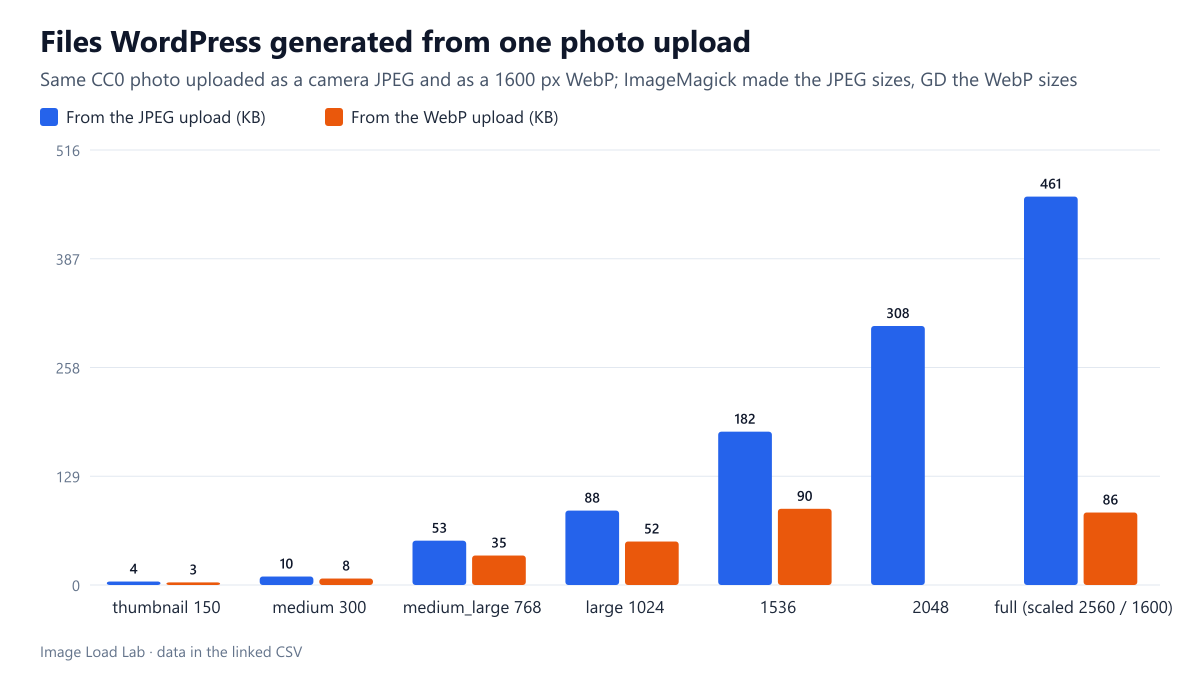
The WebP sizes were lossy and metadata-free. Every WebP size was a plain lossy VP8 file without EXIF or ICC chunks. They were 24–50 % smaller than the JPEG sizes of the same dimensions, but they also started from a different upload (a 1600-pixel WebP rather than the camera original), so the comparison is not of equal quality; our plugin checklist measured the equal-quality savings.
| Upload | Size | Pixels | KB | JPEG quality (from tables) / WebP type | Chroma | Scan | EXIF kept |
|---|---|---|---|---|---|---|---|
| original.jpg | file as uploaded (camera JPEG) | 5184×3456 | 2,847.5 | 93 | 4:4:4 | progressive | no |
| original.jpg | uploaded file as served | 2560×1707 | 461.1 | 82 | 4:4:4 | baseline | no |
| original.jpg | original kept (big-image threshold) | – | 2,847.5 | 93 | 4:4:4 | progressive | no |
| original.jpg | medium | 300×200 | 10.1 | 82 | 4:4:4 | baseline | no |
| original.jpg | large | 1024×683 | 88.4 | 82 | 4:4:4 | baseline | no |
| original.jpg | thumbnail | 150×150 | 4.2 | 82 | 4:4:4 | baseline | no |
| original.jpg | medium_large | 768×512 | 52.6 | 82 | 4:4:4 | baseline | no |
| original.jpg | 1536×1536 | 1536×1024 | 182.0 | 82 | 4:4:4 | baseline | no |
| original.jpg | 2048×2048 | 2048×1365 | 307.5 | 82 | 4:4:4 | baseline | no |
| original.jpg | full | 2560×1707 | 461.1 | 82 | 4:4:4 | baseline | no |
| 1600.webp | uploaded file as served | 1600×1067 | 86.1 | lossy (VP8) | – | – | no |
| 1600.webp | medium | 300×200 | 7.7 | lossy (VP8) | – | – | no |
| 1600.webp | large | 1024×683 | 51.6 | lossy (VP8) | – | – | no |
| 1600.webp | thumbnail | 150×150 | 3.1 | lossy (VP8) | – | – | no |
| 1600.webp | medium_large | 768×512 | 35.1 | lossy (VP8) | – | – | no |
| 1600.webp | 1536×1536 | 1536×1024 | 90.5 | lossy (VP8) | – | – | no |
| 1600.webp | full | 1600×1067 | 86.1 | lossy (VP8) | – | – | no |
What you can change
- Quality: the
wp_editor_set_qualityfilter changes the 82 default. Our quality equivalence test helps choose a value; for MozJPEG, quality 72–75 already reached high quality on our photos, but WordPress does not use MozJPEG. - Chroma subsampling: WordPress has no setting for it. If your uploads are 4:4:4, converting them to 4:2:0 before upload may shrink every generated size, as the table above suggests.
- Progressive JPEG: also not exposed; our progressive JPEG test measured about 3 % smaller files when progressive.
- Metadata: stripped from the generated sizes on this host, which is good for privacy, but the original upload is stored too; see our EXIF test.
- Check your own host: Tools → Site Health → Info → Media Handling shows the active editor and supported formats.
Practical conclusion
On this host, WordPress made its JPEG sizes with ImageMagick at exactly quality 82, baseline, 4:4:4 and without metadata, and its WebP sizes with GD as lossy files without metadata. The 4:4:4 sampling cost 15–18 % extra on our photo. Knowing these defaults tells you which settings are worth changing before or after upload.
Limitations
One host, one photo and one WordPress version; other hosts have other ImageMagick versions or use GD for everything, and plugins can change all of these settings. Quality estimation from quantisation tables identifies the IJG quality setting exactly only when the encoder uses the standard tables, which was the case here.
Data and files
Download wp-anatomy.csv (17 rows, 3.2 KB) · Download wp-chroma82.csv (6 rows, 0.3 KB) · Method: testing methodology. Photo: image credits.